
Agent Orchestration
Plugin
claudeclaw
Your Claude Code CLI, delivered to your phone via Telegram. ClaudeClaw is not a chatbot wrapper.

Plugin Signal48/100Fair
maintained24
capable41
documented100
adopted48
Install
$ npx -y skills add earlyaidopters/claudeclaw --agent claude-code
Stats
173
Stars
113
Forks
Quiet
Maintenance
TypeScript
Language
6mo ago
Last commit
8mo ago
Created
6h ago
Added
What's inside
Skill(6 skills)
README
ClaudeClaw
 ██████╗██╗      █████╗ ██╗   ██╗██████╗ ███████╗
██╔════╝██║     ██╔══██╗██║   ██║██╔══██╗██╔════╝
██║     ██║     ███████║██║   ██║██║  ██║█████╗
██║     ██║     ██╔══██║██║   ██║██║  ██║██╔══╝
╚██████╗███████╗██║  ██║╚██████╔╝██████╔╝███████╗
 ╚═════╝╚══════╝╚═╝  ╚═╝ ╚═════╝ ╚═════╝╚══════╝

 ██████╗██╗      █████╗ ██╗    ██╗
██╔════╝██║     ██╔══██╗██║    ██║
██║     ██║     ███████║██║ █╗ ██║
██║     ██║     ██╔══██║██║███╗██║
╚██████╗███████╗██║  ██║╚███╔███╔╝
 ╚═════╝╚══════╝╚═╝  ╚═╝ ╚══╝╚══╝
Your Claude Code CLI, delivered to your phone via Telegram.
ClaudeClaw is not a chatbot wrapper. It spawns the actual claude CLI on your Mac or Linux machine and pipes the result back to your Telegram chat. Everything that works in your terminal (your skills, your tools, your context) works from your phone.
Get started
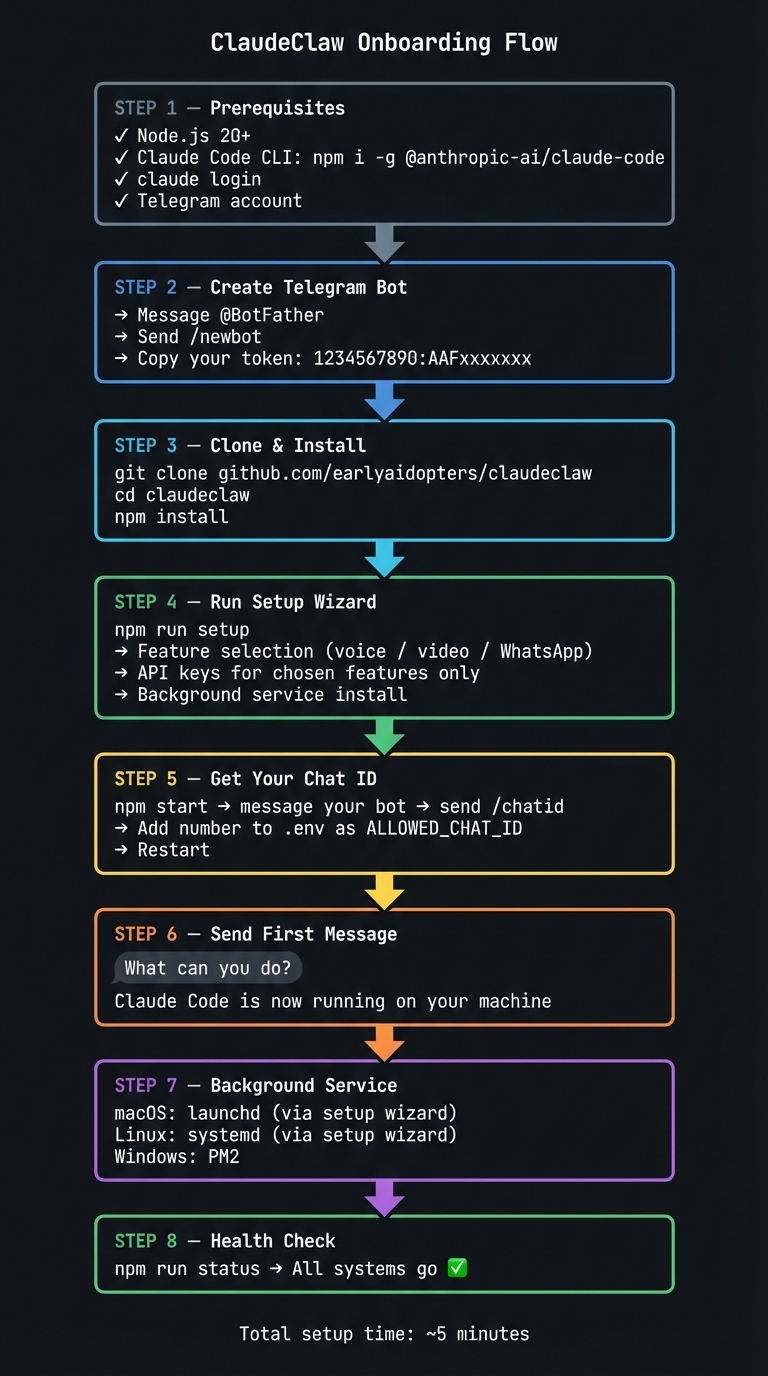
Follow these steps in order. The whole thing takes about 5 minutes.
Step 1: What you need before anything else
| Requirement | Notes |
|---|---|
| Node.js 20+ | Check: node --version. Download at nodejs.org |
| Git | Check: git --version. If you've never used git, also run the two commands below |
| Claude Code CLI | Install: npm i -g @anthropic-ai/claude-code |
| Claude account | Log in: claude login (free, Pro, or Max plan) |
| Telegram account | Any existing account works |
First time using git? Run these two commands first (use your own name and email):
git config --global user.name "Your Name"
git config --global user.email "you@example.com"
Without this, git operations will fail with a confusing error about missing identity.
macOS users: After starting ClaudeClaw for the first time, your Mac may show "Node wants to access..." permission dialogs. You need to click Allow on each one or the bot will silently hang. Keep an eye on your Mac screen during the first run.
Which Claude plan works best? ClaudeClaw runs the claude CLI, so any plan works (Free, Pro, Max). However, complex multi-step tasks (building skills, debugging code, multi-agent work) perform significantly better on Opus: If you're on the Free or Pro plan and Claude struggles with a task, the model matters. Sonnet is fast but often can't handle the kind of agentic work ClaudeClaw enables. Max ($100 or $200) with Opus is the recommended experience.
New to the terminal? Download Warp, it's a modern terminal with AI built in. If you hit any OS-level issues during setup (permissions, missing tools, PATH problems), type /agent in Warp and describe what went wrong. It will walk you through fixing it. This alone will save you hours of Googling.
That's it for hard requirements. Everything else (voice, video, WhatsApp) is optional and the setup wizard will ask about them.
Step 2: Create a Telegram bot
You need a bot token from Telegram. This is what ClaudeClaw uses to send and receive messages.
- Open Telegram and search for @BotFather
- Send
/newbot - Follow the prompts, give it a name and a username (e.g.
MyAssistantBot) - Copy the token BotFather gives you, it looks like
1234567890:AAFxxxxxxx
Keep this token handy for the next step.
Step 3: Clone and install
git clone https://github.com/earlyaidopters/claudeclaw.git
cd claudeclaw
npm install
Step 4: Run the setup wizard
npm run setup
The wizard walks you through everything interactively:
- Checks your environment (Node, Claude CLI, builds if needed)
- Asks which features you want (voice input, voice output, video analysis, WhatsApp)
- Sets up your Telegram bot token and chat ID
- Configures security: PIN lock, emergency kill phrase, idle auto-lock
- Opens your editor to personalize
CLAUDE.md - Lists the skills you'll want to install and where to get them
- Prompts for API keys only for the features you selected
- Installs a background service (launchd on macOS, systemd on Linux, PM2 on Windows)
Prefer to let Claude handle it? After cloning,
cdinto the repo, runclaude, and paste:I just cloned ClaudeClaw. Please read README.md and set me up completely. install deps, configure .env, help me get any API keys I need, and set up the background service for my OS.
Step 5: Get your Telegram chat ID
Your chat ID locks the bot to you, no one else can use it.
- Start the bot:
npm start - Open Telegram and message your bot
- Send
/chatid - The bot replies with a number. that's your chat ID
- Add it to
.env:ALLOWED_CHAT_ID=your_number_here - Restart: stop the bot (Ctrl+C) and run
npm startagain
The setup wizard does this step automatically if you run
npm run setupbefore starting.
Step 6: Send your first message
With the bot running, send any message. Try:
What can you do?
or
Check my calendar for today
or just start talking. Claude Code is running on your machine, it has access to your files, the web, and every skill you've installed.
Step 7: Run as a background service
You probably want ClaudeClaw running automatically, not manually in a terminal.
macOS: the setup wizard installs a launchd agent. Or manually:
# After running npm run setup, it's already installed.
# Logs:
tail -f /tmp/claudeclaw.log
Linux: the setup wizard installs a systemd user service:
systemctl --user status claudeclaw
journalctl --user -u claudeclaw -f
Windows: use WSL2 (recommended) and follow the Linux steps, or:
npm install -g pm2
pm2 start dist/index.js --name claudeclaw
pm2 save && pm2 startup
Step 8: Check everything is healthy
npm run status
Output looks like:
  ✓  Node v22.3.0
  ✓  Claude CLI 1.0.12
  ✓  Bot token: @YourBotName
  ✓  Chat ID: 1234567890
  ✓  Voice STT: Groq (configured)
  ⚠  Voice TTS: not configured
  ✓  Service: running (PID 12345)
  ✓  Memory DB: 47 memories stored
  ─────────────────
  All systems go.
Updating ClaudeClaw
When a new version is released, update in 5 commands:
cd claudeclaw          # go to your ClaudeClaw directory
git pull               # pull the latest code
npm install            # install any new dependencies
npm run migrate        # apply any pending migrations
npm run build          # recompile TypeScript
Then restart the bot (Ctrl+C and npm start, or restart the background service).
Do not point Claude at the GitHub URL to read updates. Claude works with local files, so you need the repo cloned on your machine. git pull is how you stay current.
Upgrading from V1? If you heavily customized V1, start fresh with V2 and copy over your .env and any CLAUDE.md customizations. If you kept V1 mostly stock, git pull will work.
How it works
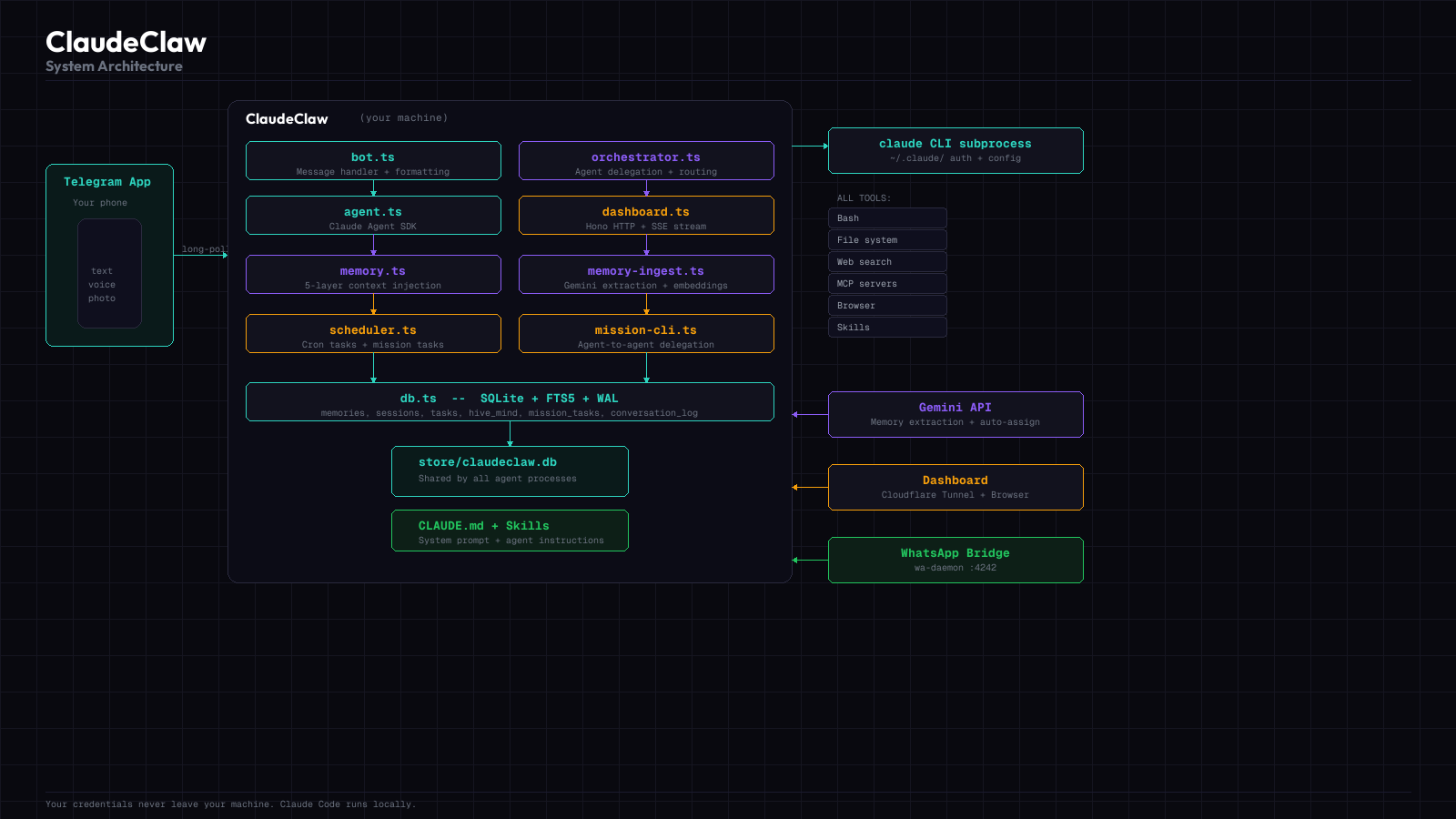
What's included
Zero extra API keys needed
With just TELEGRAM_BOT_TOKEN and ALLOWED_CHAT_ID:
| Feature | Works? | Notes |
|---|---|---|
| Text messaging | ✅ | Full Claude Code, all tools |
| Photos | ✅ | Claude reads and analyzes them |
| Documents | ✅ | PDF, code, text. anything Claude Code can open |
| SQLite memory | ✅ | Auto-initialized on first run, nothing to configure |
| Session persistence | ✅ | Context carries across every message |
| Scheduled tasks | ✅ | Ask Claude to run anything on a cron schedule |
| Mission Control | ✅ | Dashboard task board with auto-assign. Needs GOOGLE_API_KEY for auto-assign |
| Web dashboard | ✅ | Live monitoring via Cloudflare tunnel. Needs DASHBOARD_TOKEN |
| Multi-agent | ✅ | Run multiple specialized agents in parallel |
| All your skills | ✅ | Every skill in ~/.claude/skills/ auto-loads |
WhatsApp (/wa) | ✅ | No API key, but needs the wa-daemon running |
| Voice input | ❌ | Needs GROQ_API_KEY |
| Voice output (macOS) | ✅ | Uses say + ffmpeg locally, no API key needed |
| Voice output (cloud) | ❌ | ElevenLabs or Gradium API key for higher quality |
| Video analysis | ❌ | Needs GOOGLE_API_KEY + gemini-api-dev skill |
| Memory consolidation | ❌ | Needs GOOGLE_API_KEY for Gemini-powered pattern detection |
API keys: what each does and alternatives
Telegram Bot Token (required)
Get it: @BotFather → /newbot. free, instant.
Groq: voice input (optional)
What it does: Transcribes your voice notes using Whisper before passing them to Claude.
Get it: console.groq.com. free tier, no card needed.
Model: whisper-large-v3
| Alternative | Cost | Notes |
|---|---|---|
| Groq (default) | Free | Fastest to set up |
| OpenAI Whisper | ~$0.006/min | Swap transcribeAudio() in src/voice.ts |
| AssemblyAI | Free tier | More features |
| Local Whisper.cpp | Free | No API, runs on your Mac. needs code change |
ElevenLabs: voice output (optional)
What it does: Converts Claude's responses to audio in your cloned voice.
Get it: elevenlabs.io → clone your voice under "Voice Lab" → copy the Voice ID string.
Model: eleven_turbo_v2_5
Tuning: Edit src/voice.ts if the cloned voice sounds off:
stability: 0.5        (higher = more consistent but robotic)
similarity_boost: 0.75  (higher = closer to you but can distort)
| Provider | Cost | Notes |
|---|---|---|
| ElevenLabs (primary) | Free tier + paid | Best cloning quality |
| Gradium AI (built-in alternative) | Free tier (45k credits/mo) | Add GRADIUM_API_KEY + GRADIUM_VOICE_ID to .env |
| macOS say + ffmpeg (built-in fallback) | Free | No API key. works offline. Set TTS_VOICE in .env to change voice |
| OpenAI TTS | ~$0.015/1k chars | Good quality, no cloning. needs code change |
| Google Cloud TTS | Free tier | More robotic. needs code change |
The TTS cascade tries ElevenLabs first, falls back to Gradium, then to macOS say. Configure whichever providers you want. even just the local fallback works fine.
Google: video analysis (optional)
What it does: Analyzes videos you send using Gemini. Also handles images, audio, function calling, structured output, and code execution via the gemini-api-dev skill.
Get it: aistudio.google.com → "Get API key". free tier.
Skill to install: The gemini-api-dev skill is published by Google at:
- Skill docs: github.com/google-gemini/gemini-skills/.../gemini-api-dev/SKILL.md
- Repo: github.com/google-gemini/gemini-skills
- Install: copy the
gemini-api-devfolder into~/.claude/skills/
The skill reads GOOGLE_API_KEY from the environment automatically.
Anthropic API key (optional)
What it does: Bypasses your Max subscription and uses pay-per-token billing instead.
When to use it: Server deployments, or if you want zero ambiguity about billing. The Max plan assumes "ordinary individual usage". an always-on bot can hit limits faster than expected.
Get it: console.anthropic.com
Google Workspace CLI (optional)
ClaudeClaw ships with bundled Gmail and Google Calendar skills that work great out of the box. This is an optional alternative if you want broader Google Workspace access from a single tool.
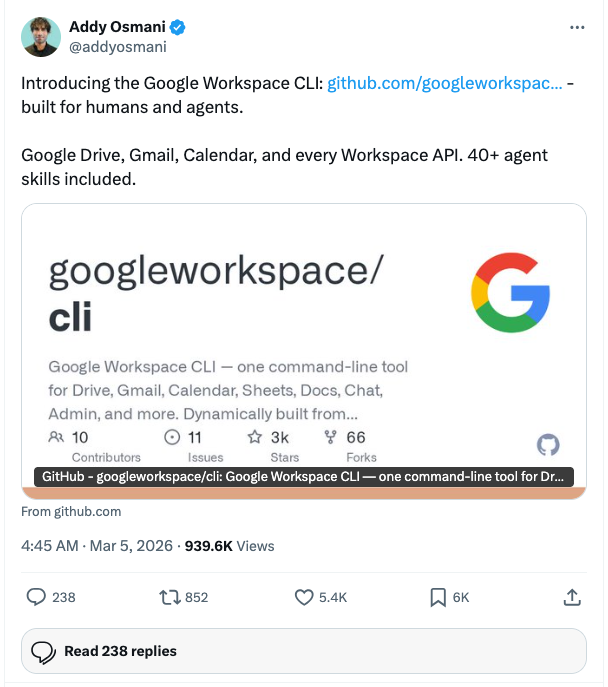
Google released an official CLI that covers Drive, Gmail, Calendar, Sheets, Docs, Chat, Admin, and every other Workspace API in one tool. It's dynamically built from Google Discovery Service and includes 40+ agent skills out of the box.
File tree
FAQ
claudeclaw is a Claude Code plugin with 6 hand-picked skills, indexed on Flowy in the Agent Orchestration category. Install it with the command on its page. It includes add-migration, gmail, google-calendar. Its skills do not fire on their own yet. Request auto-invocation to have Flowy route them as you prompt. Free and open source.
- What is claudeclaw?
- Your Claude Code CLI, delivered to your phone via Telegram. ClaudeClaw is not a chatbot wrapper. It spawns the actual claude CLI on your Mac or Linux machine and pipes the result back to your Telegram chat.
- How do I install claudeclaw?
- Run these in Claude Code: npx -y skills add earlyaidopters/claudeclaw --agent claude-code. Then prompt normally.
- Does claudeclaw auto-invoke its skills?
- Not yet. It is indexed on Flowy as a plain plugin. Request auto-invocation on its page and Flowy will route its skills for you as you prompt.
- Is claudeclaw free?
- Yes. Flowy is free and open source, with nothing gated. You can read every skill in full before you install.
Is this plugin yours?
Claim it with GitHubSubmit a pluginPromote it