
Deployment
Plugin
mlx-serve
OpenAI- and Anthropic-compatible local inference for Apple Silicon — MLX and GGUF — faster than LM Studio on identical MLX weights. No Python. No cloud. No Electron.

Plugin Signal72/100Solid
maintained100
capable23
documented100
adopted67
Install
$ npx -y skills add ddalcu/mlx-serve --agent claude-code
Stats
1,463
Stars
134
Forks
Active
Maintenance
Zig
Language
4h ago
Last commit
7mo ago
Created
Repo: ddalcu/mlx-serve
What's inside
Skill(2 skills)
/benchmlx-serve benchmarking methodology — bench.sh/llmprobe usage, comparison-trap rules (same-methodology cells only, spec-decode variance, thermal lies, engine naming), perf-claim etiquette. Use before running benchmarks or making any performance claim./releasemlx-serve pre-release validation checklist, CalVer versioning, release steps, and CHANGELOG style. Use when preparing or cutting a release, running pre-release validation, or writing CHANGELOG entries.
README
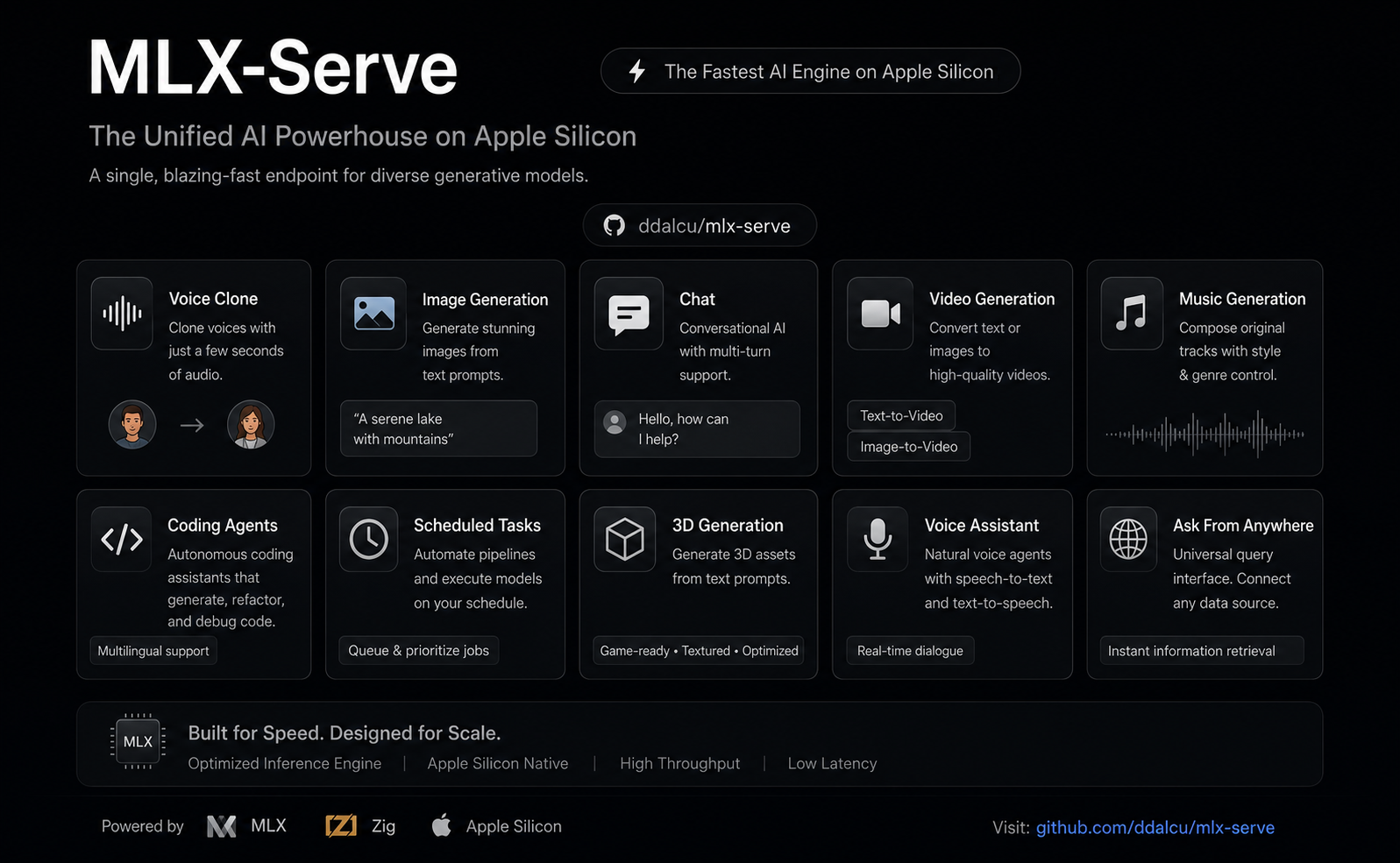
mlx-serve — run any LLM on your Mac
OpenAI- and Anthropic-compatible local inference for Apple Silicon — MLX and GGUF — faster than LM Studio on identical MLX weights. No Python. No cloud. No Electron.







mlxserve.com · Download MLX Core.app · Docs · Changelog
mlx-serve is a native Zig server that runs any LLM on Apple Silicon — MLX-format models and every GGUF on HuggingFace (Qwen, Llama, Mistral, Gemma, DeepSeek V4 Flash, thousands more). It exposes OpenAI-compatible and Anthropic-compatible HTTP APIs out of the box, so the same http://localhost:11234 works with Claude Code, the OpenAI SDK, Continue, Cursor, Open WebUI, and anything else that speaks one of those wires. Beyond text, the same server generates images, video, music, speech (with voice cloning), and 3D models — all natively on MLX. Ships with MLX Core, a macOS menu-bar app with chat, agent mode, MCP tool calling, and model management.
Get started
Needs macOS 26.2+ on Apple Silicon.
Use the app (recommended)
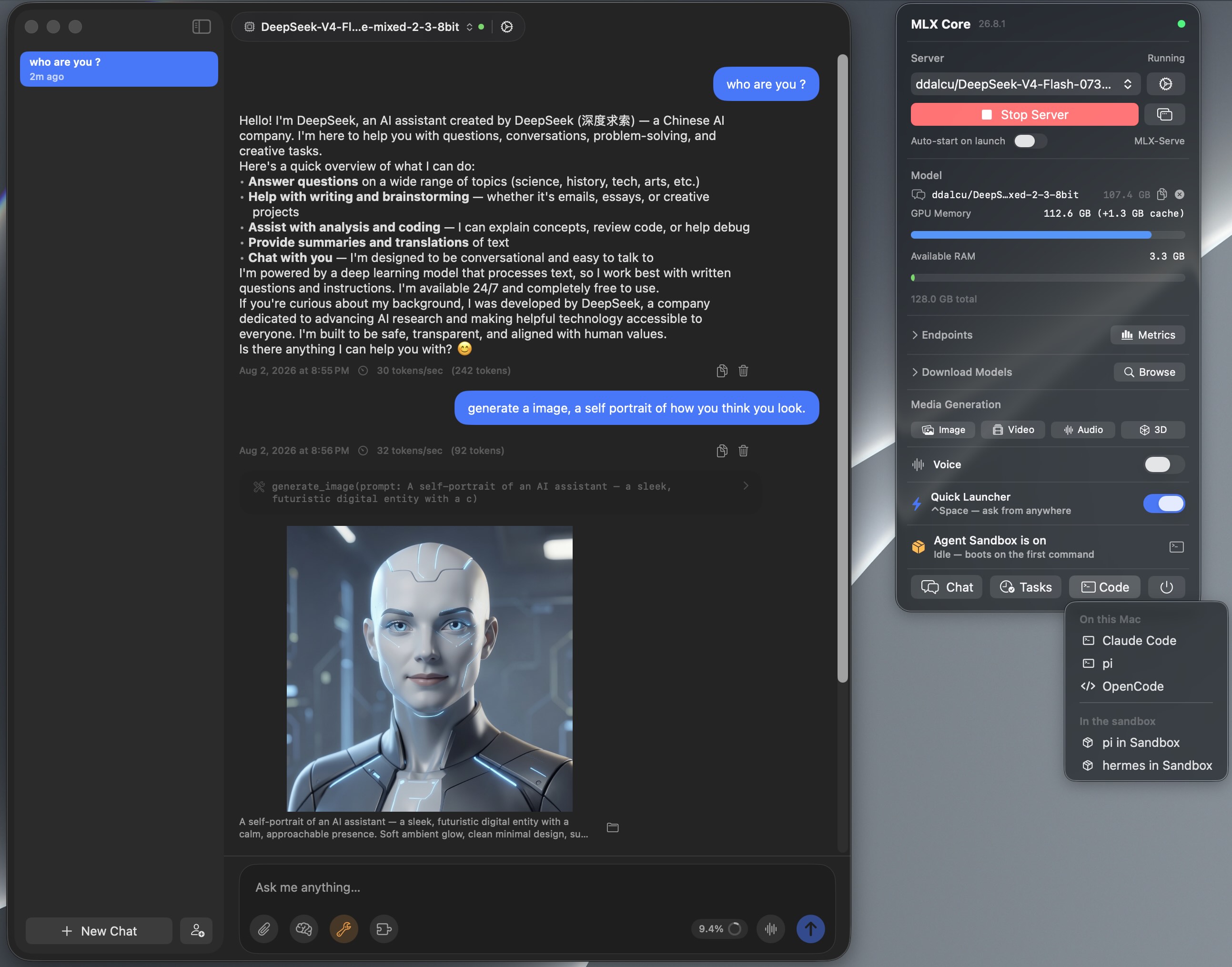
MLX Core is a signed, notarized macOS menu-bar app that bundles the server. Browse and download models with a progress UI, chat, run agent mode with MCP tools, generate images / video / music / speech / 3D, and tune every server flag from a Settings window. No terminal, nothing to configure. The server underneath is the same binary the CLI runs, on the same http://localhost:11234, so Claude Code and any OpenAI or Anthropic client can point at it while the app is running.
Download MLX Core.app — latest release for macOS (Apple Silicon)
Install via Homebrew
brew tap ddalcu/mlx-serve https://github.com/ddalcu/mlx-serve
brew install --cask mlx-core   # the app (recommended)
brew install mlx-serve         # CLI + server only, no GUI
Prefer the terminal?
Ollama-style, if that's your habit:
mlx-serve run gemma4        # downloads Gemma 4 E4B (4-bit), serves it, chats right in your terminal
mlx-serve pull qwen3.6:27b  # just download (resumable, straight from Hugging Face)
mlx-serve list              # what's on disk
mlx-serve serve             # serve everything you've pulled — models load on demand by name
Short names, org/repo HuggingFace ids, and name:tag all work. Direct --model/--model-dir invocations for scripts and headless Macs, plus every server flag, are in docs/cli.md.
And because mlx-serve speaks the Ollama API (/api/chat, /api/generate, /api/tags, /api/embed, /api/pull, …) alongside OpenAI and Anthropic, your existing Ollama-connected tools — Raycast, Obsidian, Enchanted, Open WebUI, ollama-python/js — work unchanged: point them at http://localhost:11234 and keep your workflow, on a faster engine.
Build from source
Needs Xcode 26.2+ with the Metal Toolchain component (if xcrun -sdk macosx metal --version fails, run xcodebuild -downloadComponent MetalToolchain):
git clone --recurse-submodules https://github.com/ddalcu/mlx-serve && cd mlx-serve
brew bundle install --file=Brewfile   # cmake + webp
./app/build.sh                        # app + server, ad-hoc signed
That's the whole list. Zig, mlx and llama.cpp are pinned and fetched or built by the script, and there's no Python anywhere in the build. Server-only builds are in docs/building.md.
Why mlx-serve
If you're already on LM Studio, Ollama, or mlx-lm and wondering whether to switch — here's the short version, head-to-head:
| mlx-serve | LM Studio | Ollama | mlx-lm | |
|---|---|---|---|---|
| MLX models (native Apple) | ✅ | ✅ | 🟡 | ✅ |
| GGUF models (llama.cpp) | ✅ embedded | ✅ | ✅ | ❌ |
| OpenAI-compatible API | ✅ | ✅ | partial | ❌ |
| Anthropic Messages API | ✅ | 🟡 partial² | ❌ | ❌ |
| Ollama API (drop-in for Ollama clients) | ✅ | ❌ | ✅ native | ❌ |
run <model> CLI with auto-download + REPL | ✅ | ❌ | ✅ | ❌ |
| OpenAI Responses API + WebSockets | ✅ | 🟡 partial² | ❌ | ❌ |
| DeepSeek V4 Flash (284B) | ✅ via ds4 | ❌ | ❌ | ❌ |
| Speculative decoding (PLD + drafter + native MTP) | ✅ | ❌ | partial | drafter only |
| Decode speed (geomean vs LM Studio, identical weights) | +26% (MLX, shipping defaults) | baseline | ~−15% (GGUF, est.¹) | +11% (MLX) |
| KV-cache quantization (4/8-bit) | ✅ | ❌ | partial | ✅ |
| Continuous batching | ✅ | ❌ | ✅ | ❌ |
| Built-in agent loop + MCP client | ✅ 10 tools | ❌ | ❌ | ❌ |
| Sandboxed agent shell (isolated Linux VM) | ✅ | ❌ | ❌ | ❌ |
| LAN model sharing (use another Mac's models) | ✅ | ❌ | ❌ | ❌ |
| One-click launchers (Claude Code, OpenCode, Pi) | ✅ | ❌ | ❌ | ❌ |
| Python required at runtime | ❌ | ❌ | ❌ | ✅ |
| Native menu-bar app (no Electron) | ✅ | ❌ Electron | ❌ | ❌ |
| Image generation + photo editing | ✅ | ❌ | ❌ | ❌ |
| Video generation (text / image / audio → video) | ✅ | ❌ | ❌ | ❌ |
| Speech + voice cloning | ✅ | ❌ | ❌ | ❌ |
| Music generation | ✅ | ❌ | ❌ | ❌ |
| 3D generation (image → textured 3D model) | ✅ | ❌ | ❌ | ❌ |
| License | MIT | proprietary | MIT | MIT |
¹ Ollama can't run MLX except a handful of NVFP4 conversions, so the comparison is GGUF-vs-GGUF.
² Recent LM Studio builds ship Anthropic /v1/messages and OpenAI /v1/responses compatibility endpoints, with partial coverage of each surface — mlx-serve additionally implements e.g. the Responses WebSocket transport and /v1/responses/compact.
Numbers and charts in Performance.
Highlights
- Any model: every supported MLX architecture plus the entire GGUF universe via embedded llama.cpp; DeepSeek V4 Flash through the dedicated antirez/ds4 engine.
- Four API surfaces on one port: OpenAI chat/completions and Responses (with a WebSocket transport), Anthropic Messages, and the Ollama API. Full reference in docs/api.md.
- The whole modern serving surface: streaming, tools with schema-driven auto-repair, JSON-schema constrained decoding, logprobs, vision, thinking as
reasoning_content. - Works with your coding agent: Claude Code, pi, oh-my-pi, OpenCode, OpenCode 2, Codex, hermes, aider, and editors like Zed. One-click from the app or
mlx-serve launch <agent>in the terminal, both preconfigured with the server's real context window. Setup for every tool in docs/integrations.md. - Fast: speculative decoding four ways (PLD, model-shipped draft companions, the Gemma 4 drafter, native Qwen MTP), custom Metal kernels, continuous batching, KV-cache quantization, prefix and tokenize caches. Numbers in docs/performance.md.
- Built-in web console: open
http://localhost:11234in a browser for a chat playground, live monitor, image and audio tools, and the API reference. - LAN model sharing: use another Mac's models over Bonjour with zero config; even Claude Code pointed at
localhostcan run on the Studio's 27B. - Media generation: image, video, music, speech with voice cloning, and 3D, natively on MLX, from the same server.
- No Python: a single ~7 MB Zig binary. The app ships everything signed and notarized.
Images, video, music, speech, 3D
One server, five modalities. In the app they are tray panels (click, download, generate); over HTTP they are the /v1/images, /v1/audio, /v1/video and /v1/3d endpoints. You can also ask for media straight in chat: request an image, a spoken line, a track or a clip and it renders inline in the conversation.
| Feature | Default | Other options | Approx. RAM |
|---|---|---|---|
| Image | FLUX.2-klein 4B 4-bit (mflux, ~5 GB pre-quantized) | FLUX.2-klein 9B (10 GB), Krea-2-Turbo, Mage-Flow Turbo / Edit 8-bit (8.5 / 9.1 GB) | 8 / 12 / 16 GB |
| Video | LTX-Video 2.5 4-bit (36 GB, bundled text encoder) | LTX-Video 2.5 8-bit (59 GB, sharper + diffusion decoder), LTX-Video 2.3, MiniMax-H3 (Hailuo 3.0) 4-bit / 8-bit, video and matching soundtrack in one pass | LTX 24 GB RAM; H3 26 GB (40 GB) or 44 GB (69 GB) |
| Speech | Qwen3-TTS 1.7b (voice cloning) | Qwen3-TTS 0.6b, Kokoro-82M (54 voices, ~345 MB) | 8 GB RAM, ~3.5 GB first-run download |
| Music | ACE-Step 1.5 XL Turbo 8-bit (fast, 8 steps) | MiniMax Music 3 8-bit (sings your lyrics, songs up to 6 min) | ACE 8 GB RAM, ~6.2 GB download; Music 3 ~20 GB RAM, 13.6 GB download |
| 3D | Hunyuan3D-2.1 8-bit (shape + PBR texture) | — | 16 GB RAM |
It goes well beyond text-to-X: photo editing by instruction, image-to-image, animating your photos, talking characters synced to real audio, voice cloning from seconds of audio, full music tracks, photo-to-GLB 3D models, and stacked style LoRAs. The full tour is in docs/app.md.
MLX Core (macOS app)
Menu-bar app that wraps the server with a full UI:
- Chat + agent mode: multi-session chat, PDFs and images, 10 built-in tools with per-tool approvals, an MCP marketplace, prompt-based skills, persistent memory, folder RAG.
- Agents: named assistants with their own personality, voice, model, tools, workspace and wake phrase.
- Agent Sandbox: one toggle and every agent shell command runs in an isolated Linux VM that boots in under a second. Your Mac stays untouched.
- Model browser: resumable multi-connection downloads, finds your existing LM Studio models so nothing re-downloads.
- Hands-free Voice Mode: say "Hey Loki" and talk; replies in 54 Kokoro voices or a clone of your own.
- Reach it from anywhere: ⌃Space Quick Launcher over any app, a Telegram bridge to your phone, scheduled tasks in plain English, LAN sharing between your Macs.
- Server management: every launch flag in an engine-aware Settings window, live logs, start/stop.
The full feature list is in docs/app.md.
Supported models
Native MLX dispatch for Gemma 3/4, DiffusionGemma, Qwen 3 / 3.5 / 3.6 / 3.8 / 3-Next, Meta's Muse-Glimmer-30B, inclusionAI Ling 3.0, DeepSeek V4 Flash (284B), Tencent Hunyuan 3 (295B), Thinking Machines Inkling Small (276B), poolside Laguna, Llama 3.x, Mistral, Nemotron-H, LFM2/2.5 (including the VL vision builds), plus embedding models (BERT, EmbeddingGemma, Qwen3-Embedding). Anything else runs as GGUF through the embedded llama.cpp, auto-routed by format. The full table with model_types, chat formats and vision support is in docs/models.md.
Performance
File tree
FAQ
mlx-serve is a Claude Code plugin with 2 hand-picked skills for deployment work, indexed on Flowy. Install it with the command on its page. It includes bench, release. Its skills do not fire on their own yet. Request auto-invocation to have Flowy route them as you prompt. Free and open source.
- What is mlx-serve?
- OpenAI- and Anthropic-compatible local inference for Apple Silicon — MLX and GGUF — faster than LM Studio on identical MLX weights. No Python. No cloud. No Electron.
- How do I install mlx-serve?
- Run these in Claude Code: npx -y skills add ddalcu/mlx-serve --agent claude-code. Then prompt normally.
- Does mlx-serve auto-invoke its skills?
- Not yet. It is indexed on Flowy as a plain plugin. Request auto-invocation on its page and Flowy will route its skills for you as you prompt.
- Is mlx-serve free?
- Yes. Flowy is free and open source, with nothing gated. You can read every skill in full before you install.
Is this plugin yours?
Claim it with GitHubSubmit a pluginPromote it