
Development
Plugin
axme-code
Persistent memory, architectural decision enforcement, pre-execution safety hooks, and session handoff for Claude Code. MCP server plugin for AI coding agents.

Plugin Signal57/100Fair
maintained84
capable14
documented100
adopted25
Stats
14
Stars
2
Forks
Maintained
Maintenance
TypeScript
Language
MIT
License
1mo ago
Last commit
5mo ago
Created
Repo: AxmeAI/axme-code
What's inside
MCP(1 mcp)
README
AXME Code
Claude Code forgets your project every session. We fixed it.
AXME Code is a Claude Code plugin that gives your AI coding agent persistent memory across sessions, pre-execution safety hooks, architectural decision enforcement, and structured session handoff — via an MCP server, automatically, across every session.
Stop re-explaining your architecture on session 47. Stop losing memory between session handoffs. Stop hoping the agent won't run git push --force to main. AXME Code remembers what happened, enforces your architectural decisions, continues where the last session stopped, and blocks dangerous commands before they execute — so you can focus on building.
You keep using Claude Code exactly as before. AXME Code works transparently in the background.




⭐ Star this repo if it saves you time · 🔔 Watch releases for new features · 💬 Discussions
Quick Start · Before & After · How It Works · Architecture · Website

Before & After
Session 1: "We use FastAPI, not Flask. Deploy only via GitHub Actions. Never push to main directly."
Session 2: "Like I said yesterday, we use FastAPI..."
Session 7: "For the third time this week, we use FastAPI..."
Session 47: gives up, mass-pastes 200 lines into CLAUDE.md
Session 1: Agent learns your stack, saves decisions.
Session 2: Agent calls axme_context → already knows FastAPI, deploy rules, what happened yesterday.
Session 47: Agent has your full project history: 30 decisions, 15 memories, safety rules, and a handoff from session 46.
Agent runs git push --force to main. Your Friday is ruined.
Hook intercepts the command before execution and blocks it. Not a prompt — hard enforcement at the harness level.
Agent says "Done!" — but tests don't pass, half the code is stubbed, and the deploy is broken.
Decisions enforce verification requirements: agent must run tests and show proof before reporting completion.
Quick Start
AXME Code supports three IDE paths today, ranked by lowest install friction:
Option 0: Cursor extension (1-click install — recommended for Cursor users)
For Cursor 0.42+ users — install the AXME Code extension from the Extensions panel (Open VSX). The extension bundles the binary, registers the MCP server programmatically (no manual Enable click), installs user-level safety hooks at ~/.cursor/hooks.json (apply to every project on your machine), and offers a one-click "Run setup" notification the first time you open a project without .axme-code/.
Cursor → Extensions → search "AXME Code" → Install
Or sideload the .vsix attached to the latest release (Extensions → ... menu → "Install from VSIX...").
On first activation a modal asks for an LLM credential for the session auditor: paste an Anthropic API key, a Cursor SDK key (cursor.com → Integrations), or skip the auditor. If claude CLI is logged in (claude login), the extension auto-uses your Claude subscription — no paste needed.
Option 1: Claude Code plugin (recommended for Claude Code users)
In Claude Code, run:
/plugin marketplace add anthropics/claude-plugins-community
/plugin install axme-code@claude-community
Or from the terminal:
claude plugin marketplace add anthropics/claude-plugins-community
claude plugin install axme-code@claude-community
The plugin ships with the MCP server, safety hooks, and CLI bundled together; no separate binary to install. On first use in a project, just ask the agent to call axme_context — the plugin auto-initializes the knowledge base on that session.
Option 2: Standalone binary
Install the CLI system-wide (useful if you want to run axme-code outside Claude Code, e.g. for scripting).
Linux / macOS:
curl -fsSL https://raw.githubusercontent.com/AxmeAI/axme-code/main/install.sh | bash
Installs to ~/.local/bin/axme-code. Requires Node.js 20+ on PATH (the binary is a single-file Node bundle; the installer checks for it). Supports x64 and ARM64.
Windows (native):
irm https://raw.githubusercontent.com/AxmeAI/axme-code/main/install.ps1 | iex
Installs to %LOCALAPPDATA%\Programs\axme-code and adds it to your User PATH. Requires Node.js 20+ on PATH. Supports x64 and ARM64.
Windows via WSL2: if you already live in WSL2, use the Linux install one-liner inside your distro. Install Claude Code and axme-code inside the WSL distro, not on the Windows host.
Then in each project:
cd your-project          # or workspace root for multi-repo
axme-code setup
claude                   # that's it — use Claude Code as usual
axme-code setup does three things:
- Scans your project and builds the knowledge base — oracle (stack, structure, patterns, glossary), extracts decisions, memories, and safety rules from your code, configs, CLAUDE.md, and session history
- Installs safety hooks that intercept dangerous commands before execution
- Configures the MCP server in Claude Code settings (
.mcp.json)
After setup, every Claude Code session automatically loads the full knowledge base. No config, no manual steps.
What You Get
Persistent Knowledge Base
Your agent starts every session with full context: stack, decisions, patterns, glossary, and a handoff from the previous session. No more re-explaining your architecture on session 47.
| Category | What it stores | Example |
|---|---|---|
| Oracle | Project structure, tech stack, coding patterns, glossary | "TypeScript 5.9, Node 20, ESM, esbuild" |
| Decisions | Architectural decisions with enforcement levels | "All deploys via CI/CD only" [required] |
| Memory | Feedback from mistakes, validated patterns | "Never use sync HTTP in async handlers" |
| Safety | Protected branches, denied commands, filesystem restrictions | git push --force → BLOCKED |
| Backlog | Persistent cross-session task tracking | "B-003: migrate auth to OAuth2 [in-progress]" |
| Handoff | Where work stopped, blockers, next steps | "PR #17 open, waiting on review. Next: fix flaky test." |
| Worklog | Session history and events | Timeline of all sessions and what was done |
Safety Guardrails (100% Reliable)
Hooks intercept tool calls before execution — not prompts. Even if the agent hallucinates a reason to run rm -rf /, the hook blocks it. This is hard enforcement at the Claude Code harness level, not a suggestion in a system prompt.
Blocked by default:
git push --force,git reset --hard, direct push tomain/masterrm -rf /,chmod 777,curl | shnpm publish,git tag,gh release create- Writing to
.env,.pem,.keyfiles
You can add your own custom rules via axme_update_safety or by editing .axme-code/safety/rules.yaml directly.
Automatic Knowledge Extraction
The agent saves discoveries during work via MCP tools. At session close, a structured checklist ensures nothing is missed. If you just close the window — a background auditor extracts memories, decisions, and safety rules from the full session transcript.
Multi-Repo Workspaces
Each repo gets its own knowledge base (.axme-code/). Workspace-level rules apply to all repos. Repo-specific rules stay scoped. The agent sees merged context — workspace safety floor + repo-specific decisions.
Supports 14 workspace formats: VS Code multi-root, pnpm/npm/yarn workspaces, Nx, Gradle, Maven, Rush, git submodules, and more.
Why Not Just CLAUDE.md?
CLAUDE.md is great for simple projects with a few rules. But it doesn't scale:
| CLAUDE.md | AXME Code | |
|---|---|---|
| Memory | Static, manual | Automatic, accumulates across sessions |
| Decisions | Flat text, no enforcement | Structured, required/advisory levels |
| Safety | Prompt-based (~80% compliance) | Hook-based (100% enforcement) |
| Session continuity | None | Handoff + background auditor |
| Scales to | ~50 lines | Hundreds of decisions, memories, rules |
AXME Code complements CLAUDE.md — it reads your existing CLAUDE.md during setup and extracts decisions and rules from it.
Works With Any MCP Client
AXME Code is a stdio MCP server — every MCP-compatible AI coding assistant gets the full set of axme_* tools (knowledge base read/write, safety queries, status, worklog).
| Client | MCP Tools | Safety Hooks | Auto Auditor |
|---|---|---|---|
| Claude Code (CLI / VS Code) | ✅ Full | ✅ Full | ✅ Yes |
| Cursor | ✅ Full | ❌ | ❌ |
| Windsurf | ✅ Full | ❌ | ❌ |
| Cline (VS Code) | ✅ Full | ❌ | ❌ |
| Claude Desktop | ✅ Full | ❌ | ❌ |
| Any other MCP client | ✅ Full | ❌ | ❌ |
The MCP server entry is identical in every client:
{
  "mcpServers": {
    "axme": {
      "command": "axme-code",
      "args": ["serve"]
    }
  }
}
Just place it in your client's MCP config file:
- Cursor:
~/.cursor/mcp.jsonor.cursor/mcp.json(per-project) - Windsurf:
~/.codeium/windsurf/mcp_config.json - Cline: VS Code Settings → Cline MCP →
cline_mcp_settings.json - Claude Desktop:
~/Library/Application Support/Claude/claude_desktop_config.json(macOS) or equivalent
Pre-execution safety hooks, the post-tool-use file tracker, and the background session auditor are Claude Code-specific (they require Claude Code's hook system). In other clients, the agent must call AXME tools explicitly — same knowledge base, same .axme-code/ storage, just no automatic enforcement layer.
See docs/MULTI_CLIENT.md for full per-client setup, hook workarounds, and concurrent-client semantics.
Comparison
| AXME Code | MemPalace | Mastra | Zep | Mem0 | Supermemory | |
|---|---|---|---|---|---|---|
| Capabilities | ||||||
| Structured decisions w/ enforce levels | ✅ | ❌ | ❌ | ❌ | ❌ | ❌ |
| Pre-execution safety hooks | ✅ | ❌ | ⚠️ | ❌ | ❌ | ❌ |
| Structured session handoff | ✅ | ❌ | ❌ | ❌ | ⚠️ | ❌ |
| Automatic knowledge extraction | ✅ | ❌ | ✅ | ✅ | ✅ | ✅ |
| Project oracle (codebase map) | ✅ | ❌ | ❌ | ❌ | ❌ | ❌ |
| Multi-repo workspace | ✅ | ❌ | ❌ | ❌ | ❌ | ❌ |
| Local-only storage | ✅ | ✅ | ✅ | ❌ | ❌ | ❌ |
| Semantic memory search | ✅ | ✅ | ✅ | ✅ | ✅ | ✅ |
| Multi-client support | ✅ | ✅ | ✅ | ✅ | ✅ | ✅ |
| Capabilities total | 9/9 | 3/9 | 4/9 | 3/9 | 3/9 | 3/9 |
| Benchmarks | ||||||
| ToolEmu safety (accuracy) | 100.00% | — | — | — | — | — |
| ToolEmu safety (FPR) | 0.00% | — | — | — | — | — |
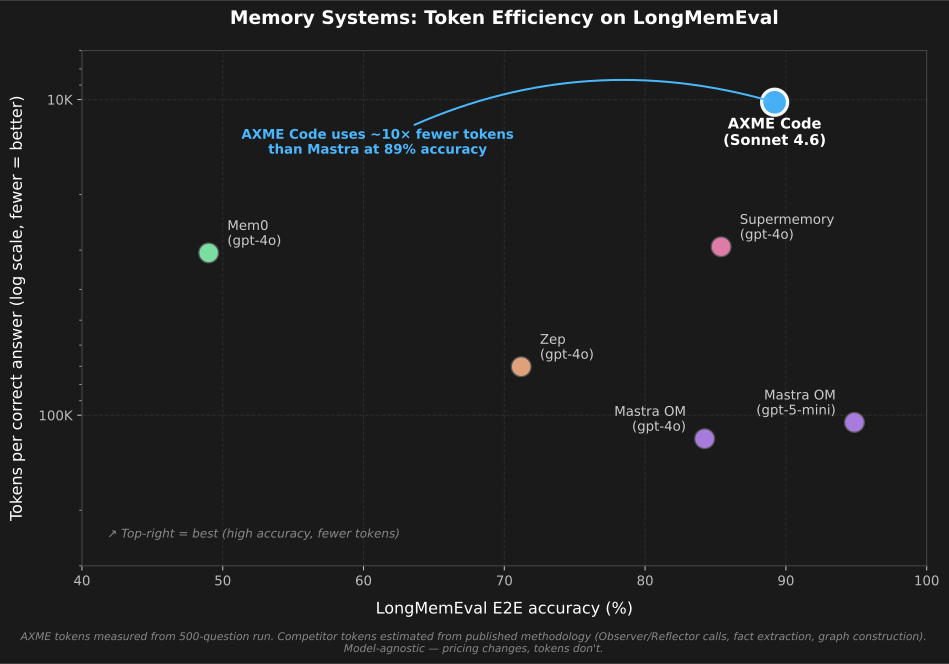
| LongMemEval E2E | 89.20% | — | 84.23% / 94.87% | 71.20% | 49.00% | 85.40% |
| LongMemEval R@5 | 97.80% | 96.60% | — | — | — | — |
| LongMemEval tokens/correct | ~10K ✓ | — | ~105K–119K | ~70K | ~31K | ~29K |
Token efficiency
File tree
FAQ
axme-code is a Claude Code plugin with hand-picked skills for development work, indexed on Flowy. Install it with the command on its page. Its skills do not fire on their own yet. Request auto-invocation to have Flowy route them as you prompt. Free and open source.
- What is axme-code?
- Persistent memory, architectural decision enforcement, pre-execution safety hooks, and session handoff for Claude Code. MCP server plugin for AI coding agents.
- How do I install axme-code?
- Run these in Claude Code: . Then prompt normally.
- Does axme-code auto-invoke its skills?
- Not yet. It is indexed on Flowy as a plain plugin. Request auto-invocation on its page and Flowy will route its skills for you as you prompt.
- Is axme-code free?
- Yes. Flowy is free and open source, with nothing gated. You can read every skill in full before you install.
Is this plugin yours?
Claim it with GitHubSubmit a pluginPromote it