
Operations
Plugin
guidance-for-claude-code-with-amazon-bedrock
guidance-for-claude-code-with-amazon-bedrock is a Claude Code plugin with 4 hand-picked skills, indexed on Flowy in the Operations category.

Plugin Signal88/100Strong
maintained99
capable83
documented100
adopted56
Install on Claude Code
> /plugin marketplace add aws-solutions-library-samples/guidance-for-claude-code-with-amazon-bedrock
In this plugin
- agents
- business-analyst
- product-owner
- project-manager
- scrum-master
- architect
- architecture-documenter
- code-archaeologist
- performance-profiler
- qa-engineer
- security-reviewer
- simple-architect
- simple-architecture-documenter
- system-designer
- test-generator
- tech-evaluator
- deployment-agent
- docs-explanation-agent
- docs-howto-agent
- docs-reference-agent
- docs-tutorial-agent
- documentation-agent
- optimization-engineer
- ux-optimizer
- performance-optimizer
- ui-designer
- commands
- skills
What's inside
Skill(4 skills)
/tool-use-structured-outputUse Bedrock tool_use to guarantee structured JSON outputs from Claude models. Eliminates JSON parsing failures by forcing responses through typed tool schemas./frontend-designCreate distinctive, production-grade frontend interfaces with high design quality. Use this skill when the user asks to build web components, blogs, pages, or applications. Generates creative, polished code that avoids generic AI aesthetics./grpo-finetuningImplement GRPO (Group Relative Policy Optimization) fine-tuning for vision-language models on small datasets. Use when SFT underperforms or training data is limited (<1000 examples)./async-inferenceImplement SageMaker async inference with S3-based I/O and polling. Use for long-running inference (>60s), large payloads, or batch processing workloads.
Agent(25 agents)
business-analystUse PROACTIVELY during requirements gathering and before technical implementation begins. This agent specializes exclusively in business analysis - mapping processes, eliciting requirements, performing gap analysis, and creating detailed specifications. Automatically generatesproduct-ownerUse PROACTIVELY during backlog grooming and sprint planning to maximize business value delivery. This agent specializes exclusively in product ownership - translating business needs into user stories, defining acceptance criteria, prioritizing features by ROI, and managingproject-managerUse PROACTIVELY at the start of each sprint or product cycle to align technical work with business objectives. This agent specializes exclusively in product strategy and prioritization - creating roadmaps, defining acceptance criteria, analyzing market needs, and maximizing ROI.
- scrum-master
- architect
- architecture-documenter
- code-archaeologist
- performance-profiler
- qa-engineer
- security-reviewer
- simple-architect
- simple-architecture-documenter
- system-designer
- test-generator
- tech-evaluator
- deployment-agent
- docs-explanation-agent
- docs-howto-agent
- docs-reference-agent
- docs-tutorial-agent
- documentation-agent
- optimization-engineer
- ux-optimizer
- performance-optimizer
- ui-designer
Command(23 commands)
/code-reviewComprehensive code review with actionable feedback using extended thinking/design-architectureComplete architecture design and documentation workflow using simple-architect and simple-architecture-documenter agents in parallel/refactor-codeIntelligent refactoring with strategic thinking and parallel analysis
Badges


README
Guidance for Claude Code and Cowork on Amazon Bedrock
This guidance enables enterprise deployment of Claude Code and Claude Cowork on Amazon Bedrock across command-line (CLI) and desktop surfaces — with secure single sign-on (SSO), usage monitoring, and cost controls.
ℹ️ Maintenance Mode
This repository is now in maintenance mode on a best-efforts basis. It remains available as a reference implementation. New contributions without GitHub issues approved by maintainers will not be accepted.
For new deployments of Claude Apps on Amazon Bedrock, we recommend Claude Apps Gateway — a self-hosted service that sits between your Claude clients and your model provider. It is included in the claude binary, so the same executable that runs Claude Code also runs the gateway. It provides:
- Corporate SSO (OIDC) with centralized policy enforcement
- Per-user cost attribution and spend caps
- Managed settings delivery
- OTLP telemetry routing
- Single stateless container deployment
👉 Get started with Claude Apps Gateway on AWS
💻 Deploying both Claude Code CLI and Claude Desktop? Add the Bootstrap Server — delivers managed settings, organization plugins, and per-user configuration to Claude Desktop at sign-in.
The following capabilities are not yet available in Claude Apps Gateway but may appear on its future roadmap. This solution provides reference patterns in the meantime:
- Claude Desktop — spend controls and model discovery may be functional, however configuration and managed settings delivery requires MDM or per-user bootstrap server.
- AWS IAM Identity Center — native IDC authentication without external OIDC
- Historical usage analytics — S3 + Athena for long-term usage queries
- Multi-platform packaging — automated installers for Windows, macOS, Linux (note: Claude Apps Gateway is native to Claude Code and requires no additional client-side packages)
- Cost tracking via IAM principal-based cost allocation — Gateway spend controls are based on cost estimates
As Claude Apps Gateway evolves, check Anthropic's documentation for the latest capabilities.
Key Features
- Secure Access: Secure single sign-on (SSO) with enterprise identity providers such as Okta, Entra ID, Auth0, Google, Cognito, or AWS IAM Identity Center — temporary credentials, automatic refresh, no API keys to manage
- Usage Monitoring: CloudWatch dashboards with per-user cost attribution, plus S3 + Athena for historical analytics
- Quota Enforcement: Per-user and per-team token limits with configurable thresholds, warnings, and block modes
- Multi-Platform: Windows, macOS, Linux — Go or Python binaries, pre-built from GitHub Releases
- One Deployment, Two Surfaces: Same infrastructure powers both Claude Code CLI and Claude Desktop (which features Chat, Cowork and Code)
- Model Flexibility: Choose from Opus, Sonnet, Haiku with model aliases (e.g.
opusplanfor Opus planning + Sonnet execution) - Native Desktop Experience: Deploy and manage Claude Desktop via MDM (Jamf, Intune, Group Policy)
- Dynamic Config Delivery: Deliver per-user settings and organization plugins to Claude Desktop at sign-in via a bootstrap server — no MDM re-push needed for config changes
- Data Residency: Select your cross-region inference profile (US, EU, AU) to keep data within your compliance boundary
- AWS-Native: Your data, your AWS account, your compliance controls — no Anthropic licensing required
Table of Contents
- Quick Start
- Architecture Overview
- Authentication Modes
- Per-User Attribution
- How It Works
- Usage Monitoring
- Quota Enforcement and Cost Controls
- Deployment
- Additional Resources
Quick Start
This guidance integrates Claude Code CLI and Claude Desktop with your existing OIDC identity provider (Okta, Entra ID, Auth0, Google, or Cognito User Pools) to provide federated access to Amazon Bedrock.
What You Need
- An OIDC identity provider (Okta, Entra ID, Auth0, Google, Cognito) OR AWS IAM Identity Center
- AWS account with IAM and CloudFormation permissions
- Amazon Bedrock activated in target regions
- Python 3.10+ for deployment
What Gets Deployed
- Authentication infrastructure (IAM OIDC Provider or IDC auth stack)
- Platform-specific installation packages (Windows, macOS, Linux)
- Optional: OpenTelemetry monitoring + quota enforcement
Deployment time: 2-3 hours for initial setup. See QUICK_START.md for step-by-step instructions.
Extend to Claude Cowork
If you've deployed this guidance for Claude Code, extend it to Claude Cowork (Claude Desktop) with one command:
poetry run ccwb cowork generate
This generates MDM configuration files (JSON, macOS .mobileconfig, Windows .reg) using your existing deployment profile. See the CoWork 3P Guide for setup and deployment details.
Architecture Overview
The architecture is modular — start with authentication, then optionally add monitoring, quota enforcement, analytics, or distribution independently as requirements grow. This guidance supports three authentication paths (see Authentication Modes for details). The recommended path is Direct IAM Federation:
Recommended: Direct IAM Federation
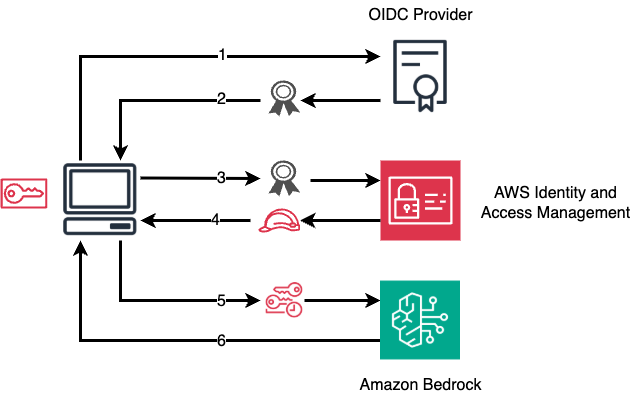
- User initiates authentication: User requests access to Amazon Bedrock through Claude Code or Claude Cowork
- OIDC authentication: User authenticates with their OIDC provider and receives an ID token
- Token exchange with AWS STS: Application calls
AssumeRoleWithWebIdentitywith the OIDC ID token - STS returns credentials: AWS STS validates the token against the registered IAM OIDC provider and returns temporary AWS credentials (scoped to Bedrock access)
- Access Amazon Bedrock: Application uses the temporary credentials to call Amazon Bedrock
- Bedrock response: Amazon Bedrock processes the request and returns the response
What Gets Deployed
ccwb init creates a profile that selects which stacks to enable. Deploy all at once with ccwb deploy, or individually with --stack <name>:
| Component | What | Deployed via |
|---|---|---|
| Authentication | IAM OIDC Provider + federated role, or IDC auth stack | ccwb deploy --stack auth |
| User packages | Platform-specific binaries (credential-process, otel-helper) + install scripts | ccwb package |
| Monitoring (optional) | Central mode: ECS Fargate OTEL collector + ALB. Sidecar mode: local collector on each machine. Both export to CloudWatch dashboards. | ccwb deploy --stack monitoring |
| Quota enforcement (optional) | Quota check API + DynamoDB policies + per-user/team limits | ccwb deploy --stack quota |
| Analytics (optional) | S3 data lake + Athena for historical SQL queries on usage data | ccwb deploy --stack analytics |
| Distribution (optional) | S3 presigned URLs or self-service landing page with IdP auth | ccwb deploy --stack distribution |
| Diagnostics | Installation health checks + resolved config dump | ccwb doctor |
See Monitoring Guide, Quota Guide, Analytics Guide, and Distribution Comparison for detailed setup.
Authentication Modes
This guidance supports three identity paths. Each path provides usage monitoring and audit trails. Per-user identity resolution and quota enforcement depend on the authentication mode chosen.
| Mode | ccwb init choice | Identity Source | Session Length | Quota Enforcement | Best For |
|---|---|---|---|---|---|
| External IdP (OIDC) | OIDC / Direct IdP | Okta, Entra ID, Auth0, Google, Cognito User Pools JWT claims | Refresh token lifetime | ✅ Full | Orgs with an existing enterprise IdP |
| AWS IAM Identity Center | AWS IAM Identity Center | AWSReservedSSO_* IAM role ARN (email in session name) | Up to 90 days (recommended: 7 days) | ✅ Via SigV4 | Orgs on native AWS identity, or where OIDC localhost callback is blocked |
| None | None | IAM user ARN or hashed role principal | AWS credential TTL | ❌ Not available | Internal tools / analytics-only deployments |
For deployment patterns and best practices, see the Claude Code deployment patterns and best practices with Amazon Bedrock blog post.
Optional: Deploy Without SSO Authentication
You can deploy the observability/analytics stack without configuring an identity provider. Select "None" during ccwb init.
- No OIDC provider or IdP configuration required
- Uses AWS IAM for access control directly
- Identity detection is automatic (IDC users: email from ARN, IAM users: username, other roles: hashed identifier)
- Best for: internal tools, analytics-only deployments, or orgs where users already have IAM access to Bedrock
Per-User Attribution
Per-user usage attribution works across all authentication modes and Claude Code CLI and Claude Desktop (Cowork):
| Auth Mode | Identity Source | Telemetry Attribution | Quota Enforcement | CUR 2.0 Cost Visibility |
|---|---|---|---|---|
| OIDC | JWT email claim | Per-user (email, team, department) | ✅ | ✅ Per-user via STS session tags |
| IAM Identity Center | IAM ARN session name | Per-user (email only) | ✅ | ✅ Per-user if ABAC attributes configured in IDC |
| None | Hashed IAM principal | Anonymous | ❌ | ✅ Per-IAM-role |
Usage from both Claude Code CLI and Claude Desktop (Cowork) counts toward the same per-user limit — a single quota applies regardless of which surface consumed the tokens.
See Quota Monitoring Guide for enforcement details and CoWork 3P Guide for Desktop-specific behavior.
How It Works
Once distributed, the credential-process binary runs on each user's machine:
- Claude Code: configured via
credential_processin~/.aws/config(AWS SDK calls it automatically) - Claude Desktop (Cowork): configured via
inferenceBedrockProfileMDM key pointing to the AWS profile that hascredential_processset

File tree
FAQ
guidance-for-claude-code-with-amazon-bedrock is a Claude Code plugin with 4 hand-picked skills, indexed on Flowy in the Operations category. Install it with the command on its page. It includes tool-use-structured-output, frontend-design, grpo-finetuning. Its skills do not fire on their own yet. Request auto-invocation to have Flowy route them as you prompt. Free and open source.
- What is guidance-for-claude-code-with-amazon-bedrock?
- This guidance enables enterprise deployment of Claude Code and Claude Cowork on Amazon Bedrock across command-line (CLI) and desktop surfaces — with secure single sign-on (SSO), usage monitoring, and cost controls.
- How do I install guidance-for-claude-code-with-amazon-bedrock?
- Run these in Claude Code: /plugin marketplace add aws-solutions-library-samples/guidance-for-claude-code-with-amazon-bedrock. Then prompt normally.
- Does guidance-for-claude-code-with-amazon-bedrock auto-invoke its skills?
- Not yet. It is indexed on Flowy as a plain plugin. Request auto-invocation on its page and Flowy will route its skills for you as you prompt.
- Is guidance-for-claude-code-with-amazon-bedrock free?
- Yes. Flowy is free and open source, with nothing gated. You can read every skill in full before you install.
Is this plugin yours?
Claim it with GitHubSubmit a pluginPromote it