
Data
Plugin
tufte-claude-skill
A Claude Code skill that turns "make me a chart" into a Tufte-compliant chart. Distilled from the three foundational books by Edward R. Tufte.

Plugin Signal47/100Fair
maintained42
capable14
documented100
adopted53
Install
$ npx -y skills add aref-vc/tufte-claude-skill --agent claude-code
What's inside
README
tufte-claude-skill
A Claude Code skill that turns "make me a chart" into a Tufte-compliant chart. Distilled from the three foundational books by Edward R. Tufte.
Install
Clone into your Claude Code skills directory:
git clone https://github.com/aref-vc/tufte-claude-skill.git ~/.claude/skills/tufte
That's it. Claude Code auto-loads the skill on next launch. To verify, run /tufte or ask Claude to "make a chart of anything."
To update later:
cd ~/.claude/skills/tufte && git pull
To uninstall:
rm -rf ~/.claude/skills/tufte
The three books, distilled
Tufte gives the three-book taxonomy himself on page 9 of Visual Explanations:
- VDQI — how to depict data and enforce statistical honesty. The book that gave us data-ink ratio, chartjunk, lie factor, small multiples.
- EI — how to lay out information in space. Layering, micro/macro readings, color rules, escaping flatland.
- VE — how to show motion, causality, narrative. The smallest effective difference, parallelism, visual confections.
Together they yield the ten principles this skill applies.
The ten principles
- Show the data. Above all else. Every other decision asks "does this help the reader see the data?"
- Maximize the data-ink ratio. Ink that would change if the data changed is data-ink. Everything else is overhead.
- Erase non-data-ink. Drop the frame box, drop the gridlines, drop the ticks at minor units.
- Erase redundant data-ink. Pick one encoding per quantity. A bar plus a number plus a gridline plus an axis tick all saying "37" is one thing said four times.
- Graphical integrity. Lie factor between 0.95 and 1.05. Bar charts start at zero. Never use area for a 1D quantity.
- Small multiples. When you have a cross-cut (region, segment, cohort), make N small charts on a shared scale instead of one chart with N lines.
- Layering and separation. Data on top, labels next, scaffolding faintest. Watch for the 1+1=3 effect — when two heavy elements interact to create unintended visual noise.
- Micro/macro readings. Good charts work at two scales: one shape from across the room, every data point legible up close.
- The smallest effective difference. "Make all visual distinctions as subtle as possible, but still clear and effective." Gray for context, one accent for focus.
- Word-data integration. Sparklines belong in sentences. Numbers belong next to their visual. Tables are charts too.
Tufte's own five-line summary from VDQI p.105:
Above all else show the data. Maximize the data-ink ratio. Erase non-data-ink. Erase redundant data-ink. Revise and edit.
How the skill works
When you ask Claude to make, design, critique, or improve any chart, the skill activates automatically. It then:
- Reads
principles.mdto recall the ten rules. - Picks the chart type from
chart-selection.mdbased on your data shape and goal — not from what's familiar or what the library makes easy. - Applies
kill-list.md— removes the things that don't belong (3D, pie, dual-axis, rainbow scales, frame boxes, redundant legends). - Produces the chart in your preferred stack: self-contained HTML/SVG, or React (Recharts + D3).
- Runs
checklist.mdas a final pass before declaring it done.
Default strictness: Tufte by default, override per chart on request ("I need a pie because the CFO wants one" → comply, but note the alternative).
The one-page cheatsheet
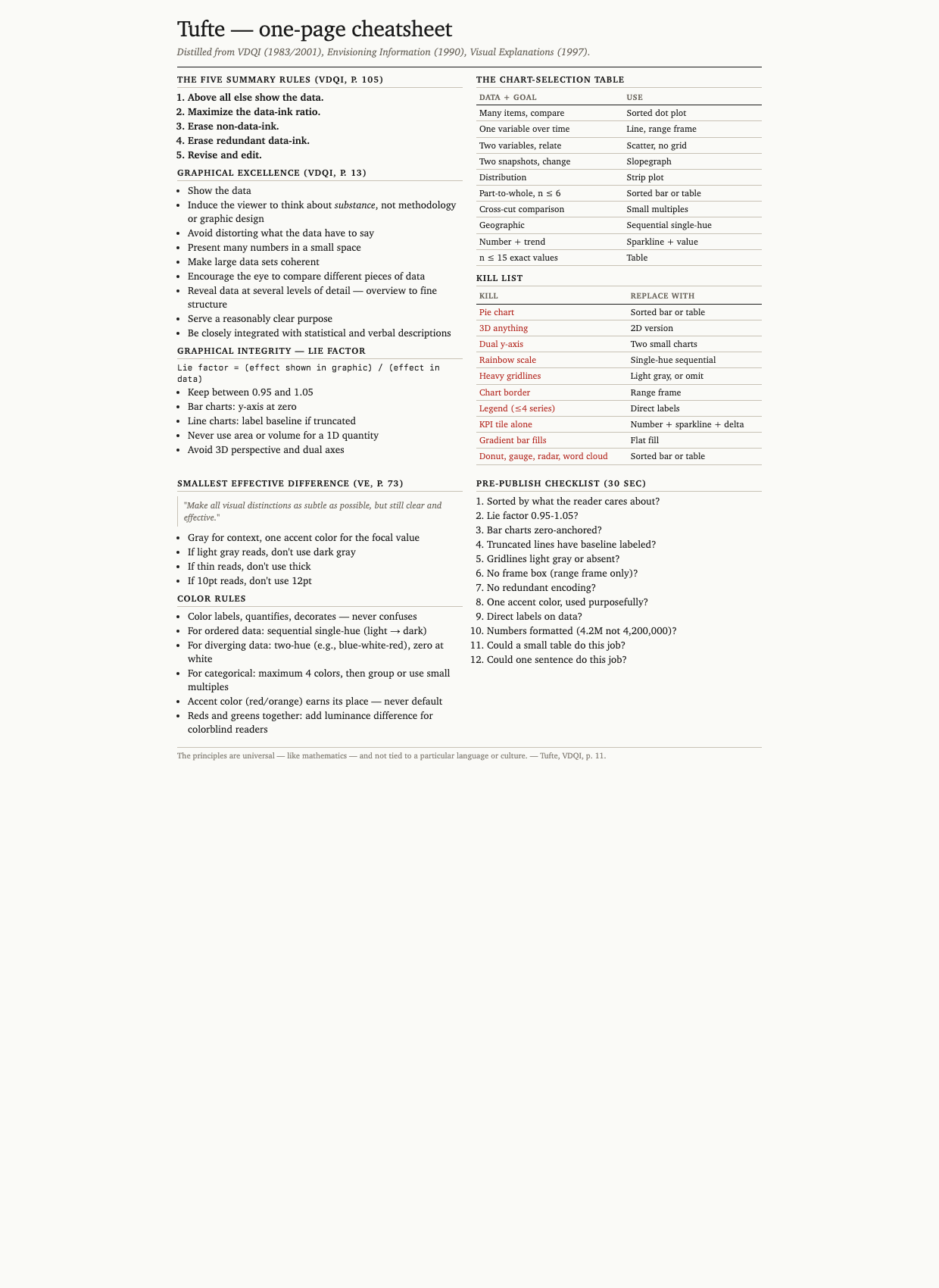
A printable reference covering principles, lie-factor formula, chart-selection table, kill list, color rules, and the 12-item checklist. Open cheatsheet.html in a browser or print cheatsheet.pdf.
Before and after
Nine pairs comparing typical AI/BI default output (left) to Tufte-applied output (right). The full interactive gallery is at before-after.html — open in any browser. Six pairs inlined here:
1. Category comparison — sales by product
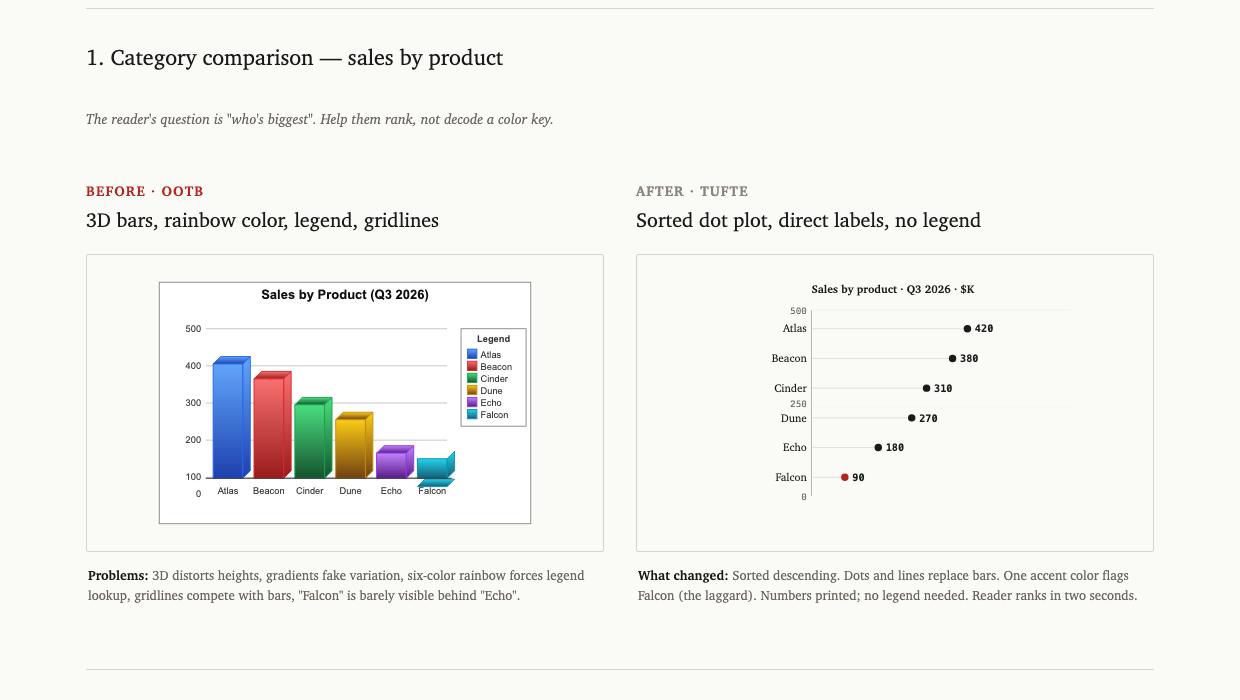
3D bars with a six-color rainbow legend become a sorted dot plot with direct labels. The reader ranks in two seconds instead of decoding a key.
2. Time series — monthly active users
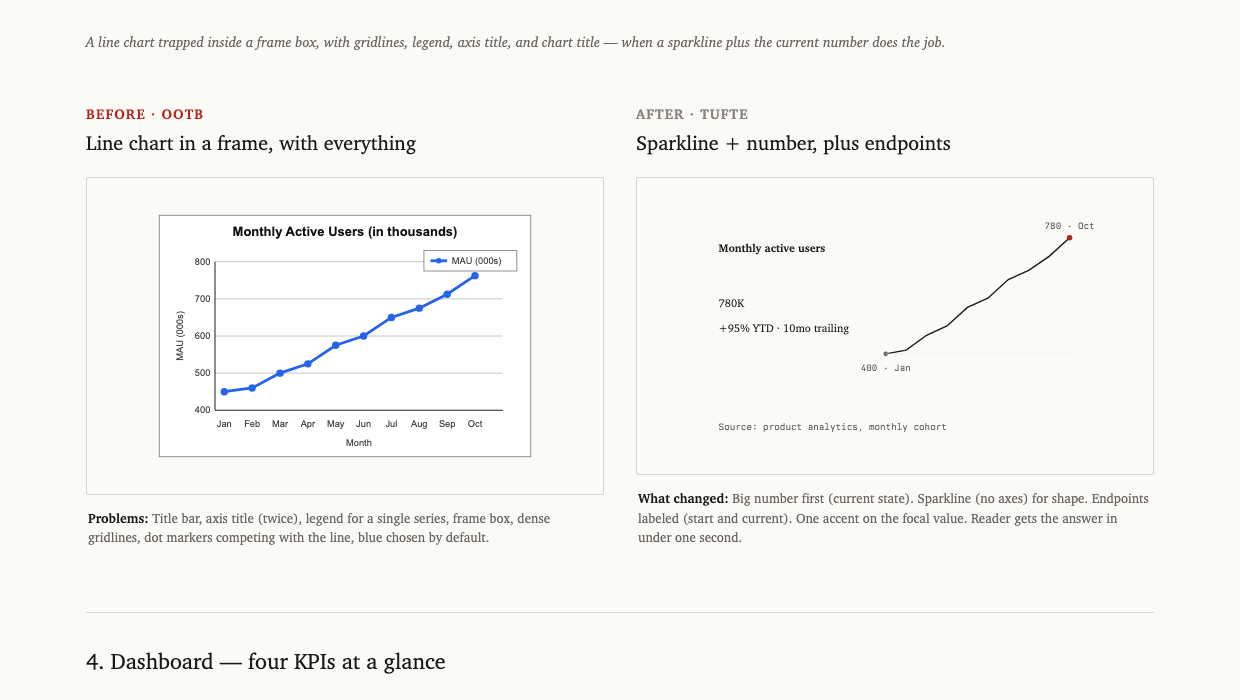
A line chart trapped in a frame box (with gridlines, legend, axis title, chart title) becomes a sparkline plus the current value plus two endpoint labels. Same data, ~80% less ink.
3. Dashboard — four KPIs
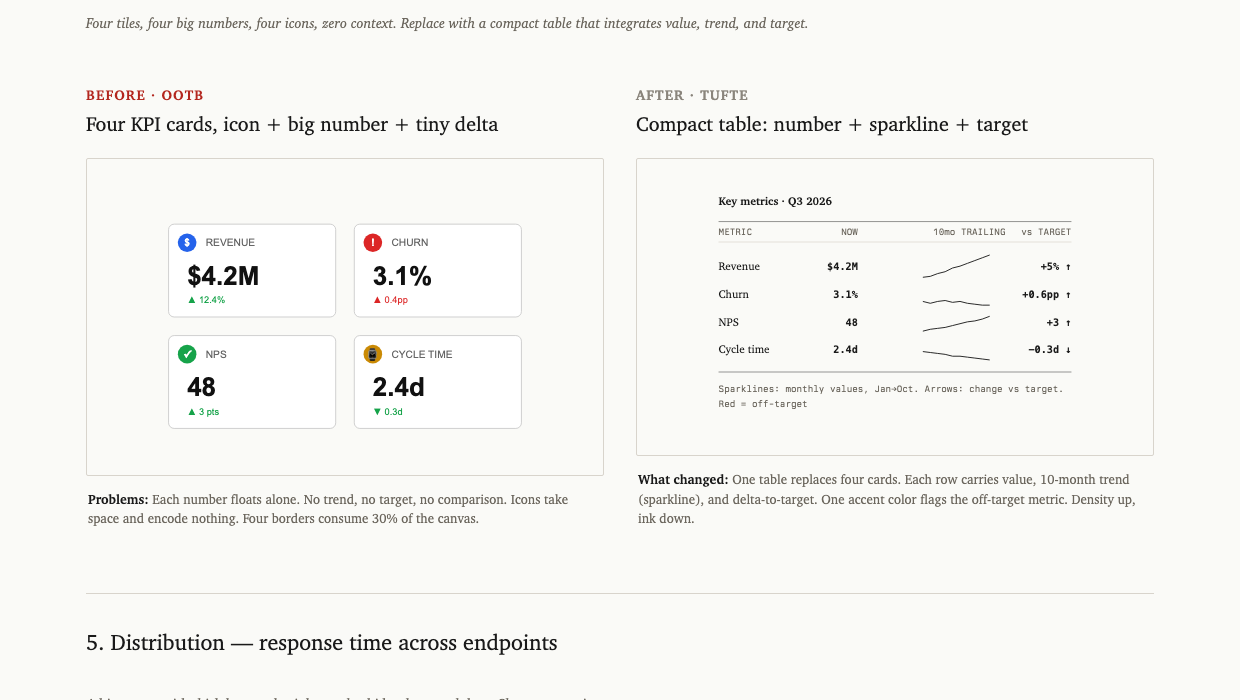
Four KPI tiles with giant numbers and decorative icons become a compact table with value, sparkline (10-month trend), and delta-to-target. One accent color flags the metric that's off-target.
4. Period comparison — Q2 vs Q3 by team
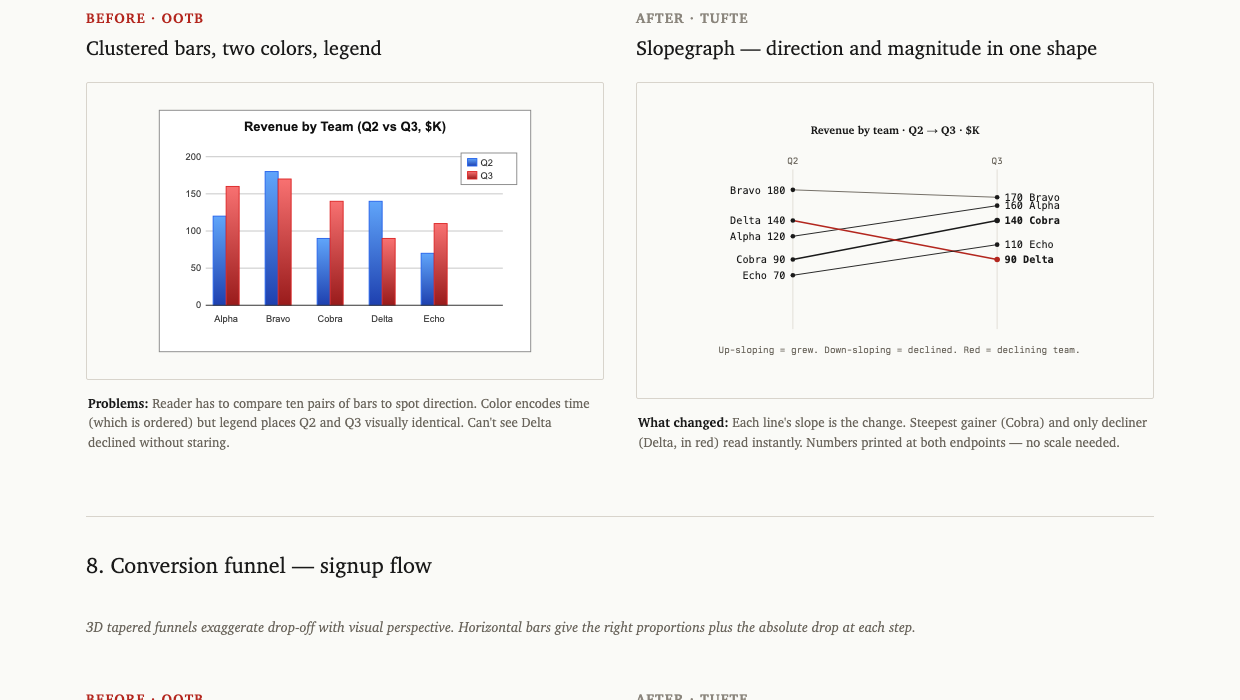
Clustered bars (two colors, ten bars to mentally pair up) become a slopegraph. Each line's slope is the change. Steepest gainer and only decliner read instantly without decoding a legend.
5. Conversion funnel — signup flow
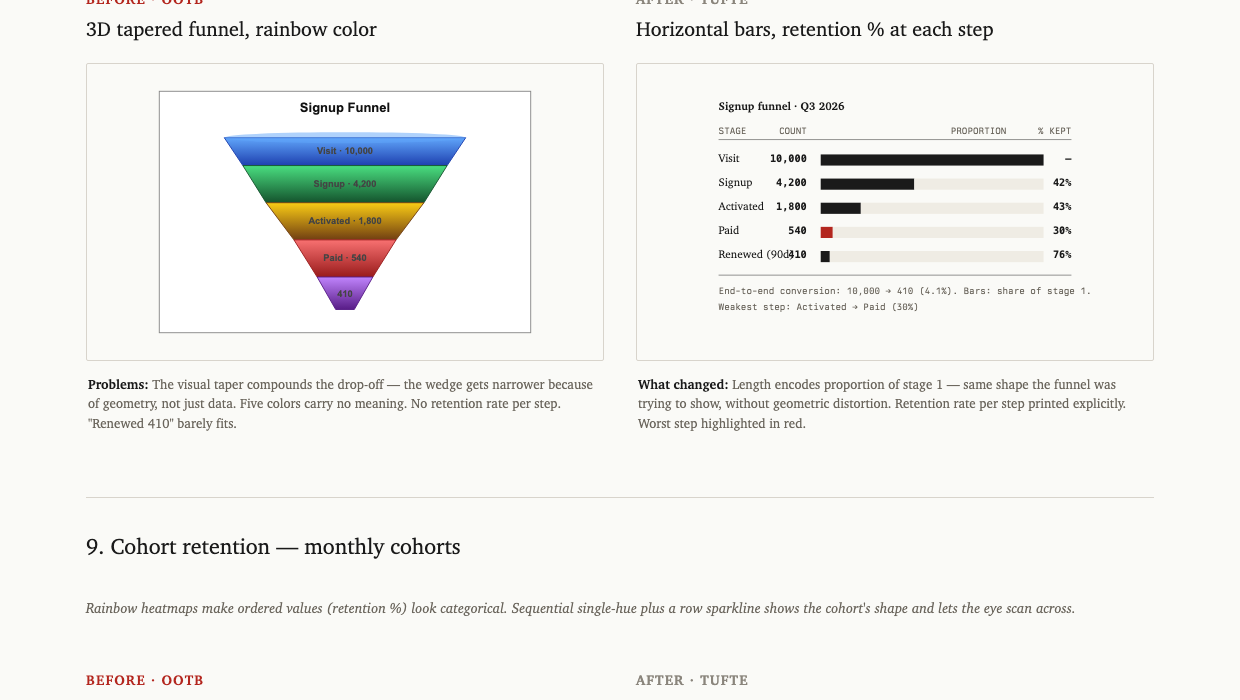
A 3D tapered funnel chart (where the visual taper exaggerates the drop-off) becomes horizontal bars sized by share of stage 1, with retention percentage printed per step. The worst step is annotated.
6. Cohort retention
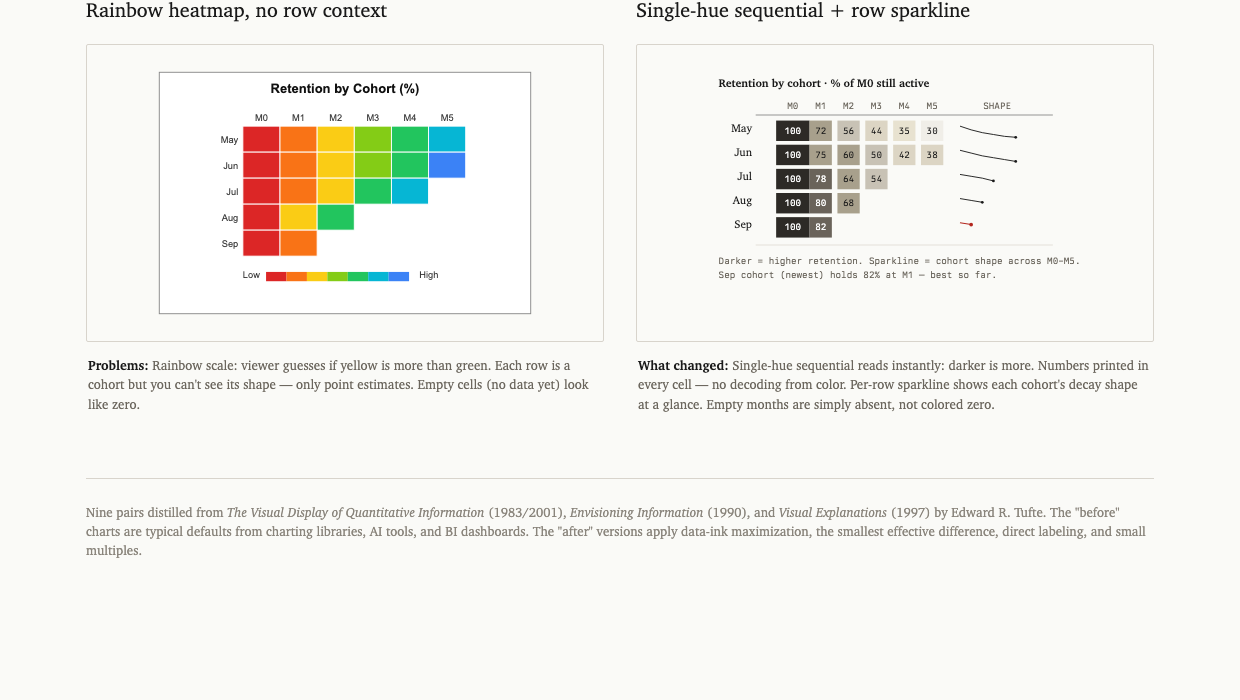
A rainbow heatmap (where viewers guess if yellow is more than green) becomes a sequential single-hue table with numbers printed in every cell and a sparkline showing each cohort's decay shape.
The other three pairs in the gallery: part-to-whole (pie → sorted table), distribution (rainbow histogram → strip plot with quantile markers), geographic (rainbow choropleth → sequential single-hue with annotations).
When to use the skill
The skill auto-activates on any of these:
- "Make a chart of...", "visualize...", "graph...", "plot..."
- "Build a dashboard for...", "design a KPI tile..."
- "Improve this chart", "critique this visual"
- "What chart should I use for...?"
- Direct invocation:
/tufteor mentioning Tufte by name - Any project where chart code is being added or edited
It does not activate for:
- Logo design, illustration, or decorative graphics
- Flowcharts, architecture diagrams, hand-drawn sketches
- Pure typography or layout that has no quantitative data
How to use the skill
Fast path
Just ask. The skill loads automatically and produces a Tufte-compliant chart:
Make a chart of monthly revenue for the last 12 months
You'll get a sparkline with the current value, two endpoint labels, no frame box, no legend.
Stack choice
Tell Claude which output you want:
| Say | You'll get |
|---|---|
| "as inline SVG" or no preference | Self-contained HTML/SVG, single file |
| "in React" or "with Recharts" | Recharts component with Tufte theme |
| "with D3" | D3-in-React (for dot plots, slopegraphs, custom small multiples) |
Override the defaults
If you specifically need something on the kill list:
Make a pie chart of revenue mix — the CFO wants a pie
Claude will produce the pie, but include a one-line comment noting the Tufte alternative (a sorted table). You stay in control.
Iterate on an existing chart
Paste your chart code or screenshot and say:
Apply Tufte to this
Claude will identify violations (frame box, gridlines, gradient fills, redundant legend, wrong sort), and produce a rewritten version.
File index
| File | Purpose |
|---|---|
SKILL.md | Trigger description + skill index (loaded by Claude) |
principles.md | The ten rules, with Tufte's exact quotes |
chart-selection.md | Data + goal → chart type decision table |
kill-list.md | What to remove from any chart |
before-after.html | Nine side-by-side comparisons (open in browser) |
checklist.md | 12-item pre-publish check |
cheatsheet.html / cheatsheet.pdf | One-page printable reference |
presets/html-svg.md | Style tokens + working SVG templates (sparkline, dot plot, line, small multiples, sparkline-in-table) |
presets/react.md | Recharts theme + D3-in-React patterns (slopegraph, dot plot, what-to-never-import list) |
Requirements
- Claude Code installed
- Skill auto-loads from
~/.claude/skills/ - No other dependencies for the skill itself
- The cheatsheet PDF is included, but to regenerate it from the HTML you'll need
weasyprint(pip install weasyprint)
Contributing
Pull requests welcome. Useful additions:
- More before/after pairs (sankey, network, gantt, calendar heatmap, control chart)
- Output presets for other stacks: Python (matplotlib, plotly), Observable Plot, Vega-Lite, ggplot2
- Examples that show Tufte applied to real-world charts you've improved
Open an issue first for anything that adds a new chart type to the decision table — let's discuss the rule before adding it.
License
MIT. Use it, modify it, ship it.
The skill content is original; quotations from Tufte's books are used under fair-use for educational reference and are attributed inline.
The principles of information design are universal — like mathematics — and are not tied to unique features of a particular language or culture.
— Edward R. Tufte, Envisioning Information, p. 10
File tree
FAQ
tufte-claude-skill is a Claude Code plugin with 1 hand-picked skill, indexed on Flowy in the Data category. Install it with the command on its page. It includes tufte-claude-skill. Its skills do not fire on their own yet. Request auto-invocation to have Flowy route them as you prompt. Free and open source.
- What is tufte-claude-skill?
- A Claude Code skill that turns "make me a chart" into a Tufte-compliant chart. Distilled from the three foundational books by Edward R. Tufte. The Visual Display of Quantitative Information1983 · 2nd ed.
- How do I install tufte-claude-skill?
- Run these in Claude Code: npx -y skills add aref-vc/tufte-claude-skill --agent claude-code. Then prompt normally.
- Does tufte-claude-skill auto-invoke its skills?
- Not yet. It is indexed on Flowy as a plain plugin. Request auto-invocation on its page and Flowy will route its skills for you as you prompt.
- Is tufte-claude-skill free?
- Yes. Flowy is free and open source, with nothing gated. You can read every skill in full before you install.
Is this plugin yours?
Claim it with GitHubSubmit a pluginPromote it